Original price
$4,188.00 SGD
-
Original price
$4,188.00 SGD
Original price
$4,188.00 SGD
Current price
$3,988.00 SGD
$3,988.00 SGD
-
$3,988.00 SGD
Current price
$3,988.00 SGD
| /
Descriptions
Janome Apps & Connectivity
Accessories
Download & Warranty
Descriptions
Janome Computerised Sewing & Embroidery
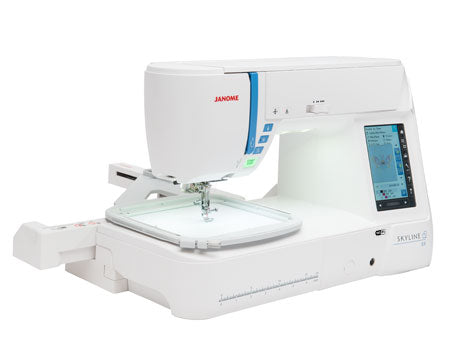
Janome Skyline S9 High-End Sewing and Embroidery Machine
The Janome Skyline S9 is a high-end combination sewing and embroidery machine designed for sewing enthusiasts, quilters, designers and creative makers who want advanced sewing functions and versatile embroidery capabilities in one machine.
Featuring 300 built-in sewing stitches, 250 built-in embroidery designs, Wi-Fi connectivity and a colour LCD touchscreen, the Skyline S9 offers a wide range of creative possibilities. Its AcuFeed Flex Layered Fabric Feeding System, automatic thread functions and embroidery editing capabilities help make complex sewing and embroidery projects more convenient.
With wireless design transfer and compatible Janome iPad applications, you can edit embroidery designs, monitor embroidery progress and create your own quilting-inspired stitch patterns.
The Janome Skyline S9 makes it convenient to switch between sewing and embroidery functions. To begin embroidery, select the embroidery function from the machine menu and engage the embroidery unit using the switch at the back of the machine.
Choose one of the built-in embroidery designs or transfer your own design from a computer, USB flash drive or compatible wireless device. Select the appropriate embroidery hoop, attach it to the embroidery arm and secure it in place to prepare for embroidery.
Janome Apps & Connectivity
The Skyline S9 works with compatible Janome applications to support embroidery editing, progress monitoring and creative design development through an iPad or other compatible iOS device.
App availability: The following applications are described in the supplied product information as free iOS applications. Availability, device compatibility and supported machine firmware may vary. Please check the Apple App Store and Janome support information before installation.
AcuEdit App
The Janome AcuEdit app allows you to edit embroidery designs on your iPad using Wi-Fi. You can modify designs at your convenience, including while your sewing machine is operating. Once your design is ready, send the embroidery data to your compatible machine wirelessly.
Listed compatible machine models:
Horizon Quilt Maker Memory Craft 15000
Horizon Memory Craft 15000 version 2.11 and earlier versions
Janome Skyline S9
Connect with Your Sewing Machine
Send embroidery data from your iPad to your compatible sewing machine.
Receive embroidery designs from the Ready to Sew and Editing modes of your sewing machine.
Prepare and transfer edited designs for embroidery.
Availability: Described as a free application for iOS devices through the Apple App Store.
Additional AcuEdit Information
Design Editing Features
Move and reposition designs
Rotate designs
Enlarge and reduce designs
Mirror image and vertical flip
Centering and cornering
Copy and paste
Arching for monogramming
Space adjustment for monogramming
Delete selected elements
Change thread colours
Change sewing order
Undo and redo editing changes
On-screen editing using touch controls
Basic editing using two-finger gestures
Display iPad photos as the editing-screen background
Import Embroidery Designs
Select designs from your embroidery collection on your iPad.
Use built-in designs from compatible sewing machines.
To use built-in designs from the Memory Craft 15000, connect to the sewing machine first.
For Skyline S9 and Atelier 9 built-in designs, download the relevant data as required.
Add monogramming designs using the keypad.
Import designs from the internet or a PC through iTunes.
Import embroidery designs from email attachments, online storage services and other applications.
Save Embroidery Designs
Save embroidery designs on your iPad.
View and delete embroidery design thumbnails.
Compatible Embroidery Formats
JEF, JEF+ and JPX
AcuMonitor App
The Janome AcuMonitor app allows you to monitor embroidery progress and check your machine's current status using a compatible iOS device over Wi-Fi.
Keep track of embroidery progress even when you are away from the machine. Check the current embroidery status, thread colours and estimated time remaining until the next thread change.
Listed compatible machine models:
Horizon Quilt Maker Memory Craft 15000
Horizon Memory Craft 15000 V2 and V1
Skyline S9 version 1.10
Connect with Your Sewing Machine
Check embroidery progress on your device.
Monitor the current machine status.
View the thread colours used in the embroidery design.
Check the estimated time remaining until the next thread change.
Availability: Described as a free application for iOS devices, designed for iPad and iPhone.
The original product information also states that this technology is patented in the USA, Japan, Europe and China.
Additional AcuMonitor Information
Machine Status Check
The following machine conditions are displayed through messages and icons:
Embroidering
Cutting
Ready to sew
Changing thread
Changing needle
Stopped
Complete
Thread breakage
Locked
No connection
Sleep mode
Other Features
Needle drop-point display to help identify the current sewing position.
Magnification function to inspect embroidery designs in greater detail.
Demonstration mode to explore planned app operations without connecting to the sewing machine.
AcuSketch App
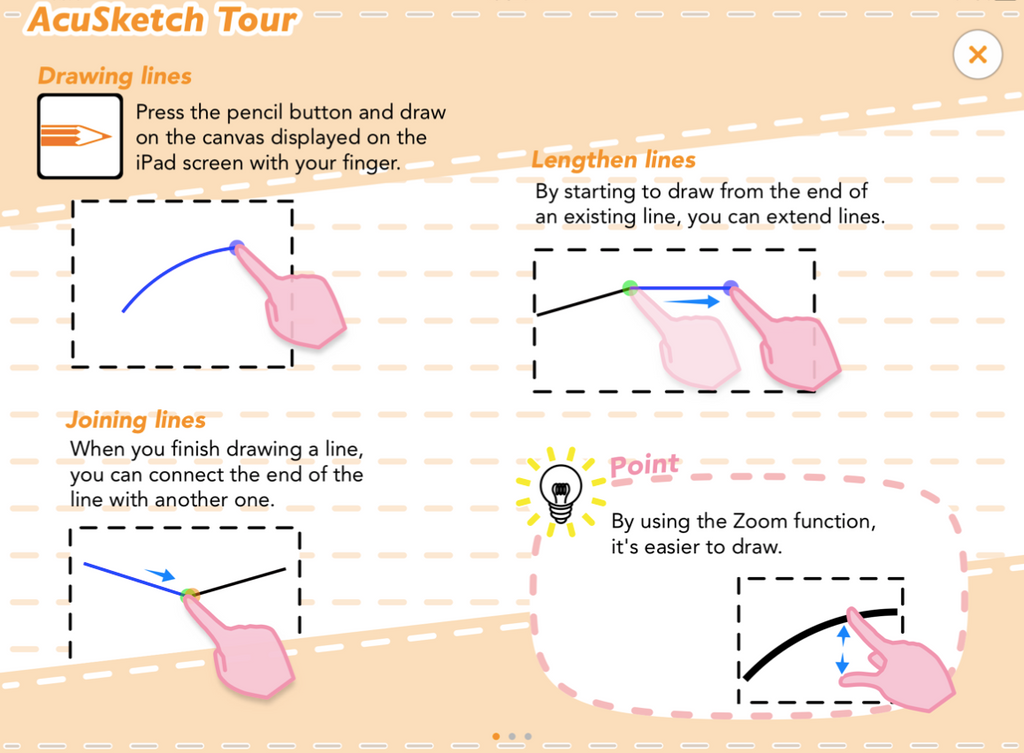
The Janome AcuSketch app allows you to create embroidery and quilting-style designs by drawing directly on the iPad screen using your finger or a stylus.
The lines you draw are converted into stitch data, allowing you to create free-motion-quilting-inspired patterns without having to use complicated digitising software.
Once your design is ready, transfer the stitch data wirelessly to a compatible Wi-Fi-enabled Janome sewing machine.
Listed compatible machine models:
Memory Craft 15000 version 2.11
Horizon Quilt Maker Memory Craft 15000
Skyline S9 version 1.10
Connect with Your Sewing Machine
Convert the lines drawn on your iPad into stitch data.
Send the stitch data wirelessly to your compatible sewing machine.
Start sewing after the machine receives the design data.
Availability: Described as a free application for iOS devices through the Apple App Store.
The original product information states that this technology is patented in the USA.
300 built-in stitches, including 3 alphabet fonts.
11 one-step buttonholes.
Automatic thread tension control.
Superior needle threader.
Snap-on presser feet.
Automatic presser foot lift.
Memorised needle up/down.
AcuFeed Flex Layered Fabric Feeding System.
Stitch tapering function.
Variable zigzag function.
AcuGuide automatic cloth guide.
Free arm sewing.
Drop feed.
Start/stop button.
Locking stitch button.
Automatic thread cutter.
Twin needle guard.
Easy reverse button.
Memory function.
Last stitch recall capability.
Adjustable knee lift.
Auto-declutch bobbin winder.
Extra-high presser foot lift.
Colour LCD touchscreen.
Automatic foot pressure adjustment.
Maximum stitch width: 9mm.
Maximum stitch length: 5mm.
Top-loading full rotary hook bobbin.
Workspace: 8.3 inches.
Built-In Sewing Stitches
The Janome Skyline S9 provides 300 built-in stitches, including three alphabet fonts and 11 one-step buttonholes. The built-in stitch reference is located inside the machine's top lid for convenient selection.
Free Arm Sewing
The free arm design makes it easier to sew tubular and smaller items such as sleeves, cuffs and trouser legs.
Janome Skyline S9 – Embroidery Function Features
Explore a wide range of embroidery possibilities with the Skyline S9's built-in designs, on-screen editing functions and wireless design transfer capabilities.
250 built-in embroidery designs, including 40 exclusive designs by Anna Maria Horner.
20 fonts for monogramming.
Maximum embroidery area: 6.7 × 7.9 inches (17 × 20cm).
Free arm embroidery.
Design transfer via Wi-Fi, USB and direct PC connection.
Embroidery speed up to 1,000 stitches per minute (SPM).
On-screen editing functions: enlarge, reduce, rotate, flip, drag and drop, re-edit, zoom, arc and combine.
Programmable jump thread trimming.
Adjustable speed while embroidering.
Flexible stitch travelling by 1, 10, 100 and 500 stitches.
Automatic return to the position after thread breakage.
Adjustable hoop position even after embroidery has started.
Cutwork capability.
Embroidery couching function.
Thread Brand Selection
The supplied product information lists the following thread brands in the machine's thread selection menu:
Janome Polyester and Acrylic
Gutermann
Sulky
Madeira
Robison-Anton
Mettler
Jenny Haskins
Standard Embroidery Hoops
Hoop
Embroidery Area
RE20a
6.7 × 7.9 inches (170 × 200mm)
SQ14a
5.5 × 5.5 inches (140 × 140mm)
FA10a
3.9 × 1.6 inches (100 × 40mm)
Explore Different Machine Embroidery Results
Video credited to Janome – Skyline S9: Anna Maria Horner explains where to use embroidery.
How to Find Designs on Your USB Flash Drive
Learn how to locate and select embroidery designs saved on a USB flash drive for use with your Janome Skyline S9.
How to Export or Save Your Embroidery Design
Watch the tutorial to learn how to export or save your embroidery designs.
Accessories
What's Included with the Janome Skyline S9
The following standard accessories and parts are listed for the Janome Skyline S9.
1/4 Inch Seam Foot O
AcuFeed Flex 1/4 Inch Seam Foot (Twin)
AcuFeed Flex Dual Feed Holder with AD Foot
AcuFeed Flex Holder and Foot (Single)
AcuFeed Zipper Foot (Single)
Automatic Buttonhole Foot R with Stabilizer Plate
Blind Hem Foot G
Button Sewing Foot
Darning Foot
Embroidery Couching Foot
Embroidery Hoop FA10 (100mm × 40mm)
Embroidery Hoop RE20a (170mm × 200mm)
Embroidery Hoop SQ14a (140mm × 140mm)
Free Motion Quilting Closed Toe Foot
Free Motion Quilting Open Toe Foot QO
Free Motion Quilting Zigzag Foot
Knee Lifter
Open Toe Satin Stitch Foot
Overedge Foot M
Quilting Guide Bar
Rolled Hem Foot
Satin Stitch Foot
Straight Stitch Needle Plate
Zigzag Foot
Zipper Foot E
Optional Accessories
An optional wide extension table is available to provide additional working space for larger sewing and quilting projects.
Enjoy one year of Ban Soon Care support with your purchase, including:
One year of complimentary servicing, excluding spare parts.
Complimentary one-to-one product learning sessions for up to one year.
Customer support and guidance for using your sewing and embroidery machine.
After-sales assistance from Ban Soon Sewing Machine Pte. Ltd.
Our team is here to help you get more from your Janome Skyline S9, from everyday sewing to creative embroidery projects. Programme terms and conditions apply.
Experience the versatility of the Janome Skyline S9 sewing and embroidery machine. Contact our team to enquire about availability, arrange a demonstration or discuss your sewing and embroidery requirements.